Plan visually. Prioritize clearly. Deliver confidently.
Structured planning that connects to Jira and Azure DevOps — or runs independently.
What StrataTree enables
Clear planning, healthy backlogs, and predictable delivery
Clear intent and structure
Hierarchical planning with Users, Features, Steps, and Stories
Backlog health at a glance
Spot oversized features, missing scope, and structural gaps
Predictable delivery
Track progress, forecast outcomes, and see what's on track
Faster time to market
Prioritize what matters within and across releases
Workflow insight
Understand how work flows and where to improve
Metrics that matter
Progress, delivery rate, and health data to inform decisions
Less effort, better results
Restructure backlogs in minutes, not hours
Execution readiness
Actionable plans ready for teams and execution tools
Backlog restructuring at scale
Quickly and easily clean, reorganize, and refactor backlogs outside execution tools, then sync them back cleanly.
Your backlog in context, not just a list
See stories in the context of features and outcomes to understand scope instantly.
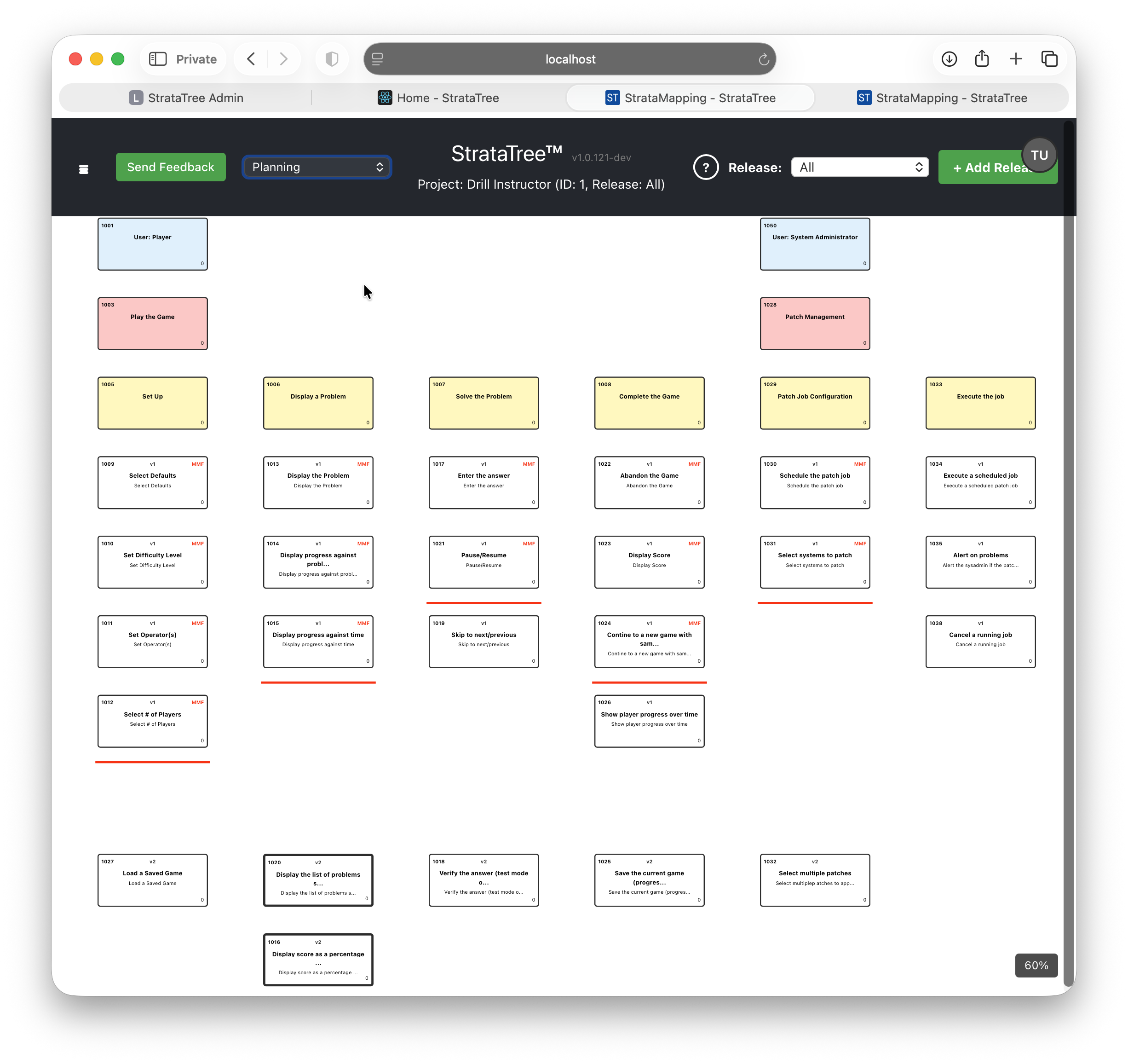
Set release scope visibly, with explicit boundaries
Define and communicate release scope using drag-and-drop planning and visible MMF boundaries.
- Define release scope clearly with visible MMF boundaries instead of endless debates.
- Model release tradeoffs in real time using drag-and-drop planning.
- Align teams and stakeholders quickly around what is in and out of scope.
- Great ideas can be out of scope, but never out of sight.
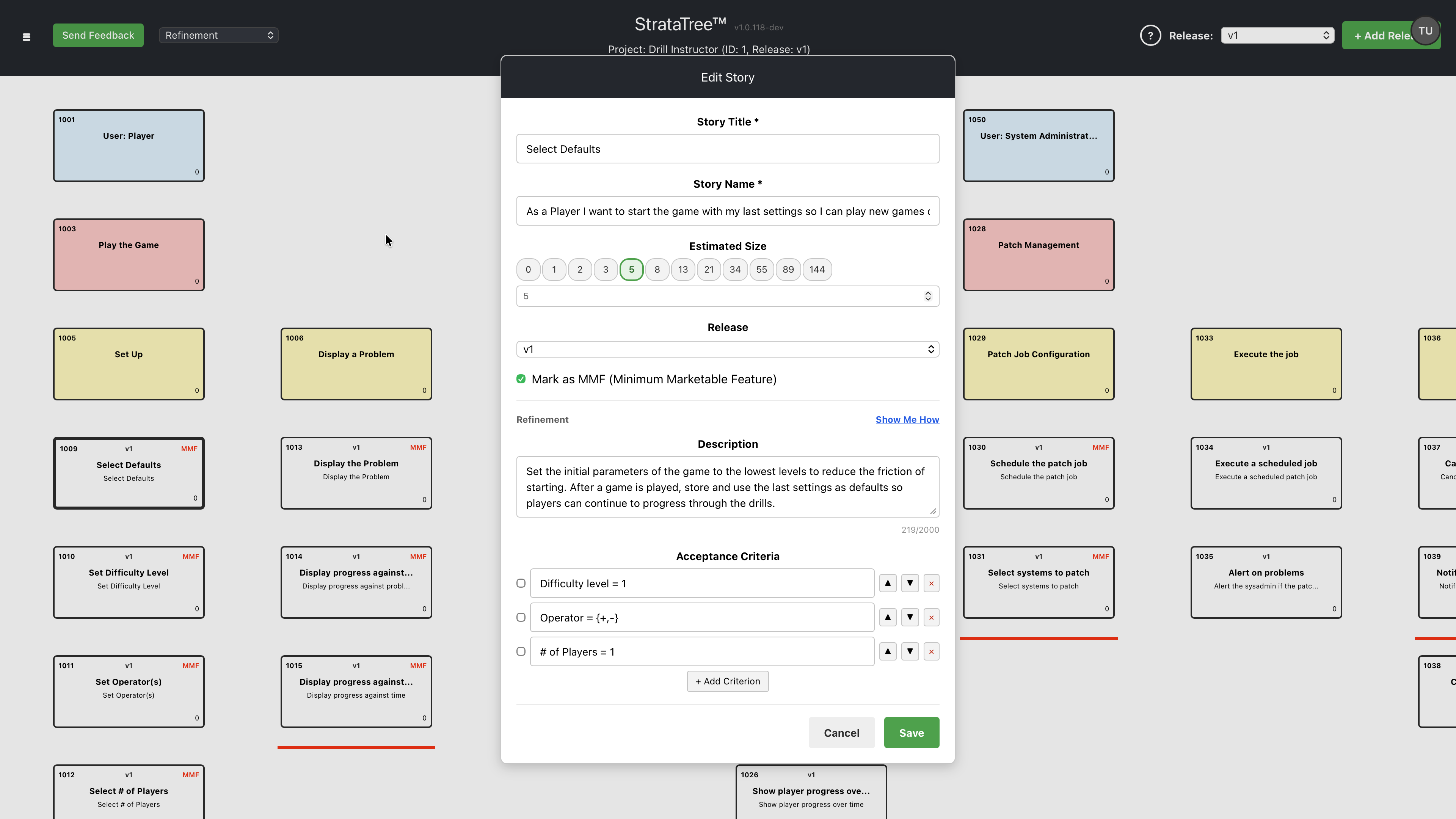
Refine your backlog, right on the StrataMap®
Add detail collaboratively — descriptions, acceptance criteria, and estimates — without leaving the map.
- Write acceptance criteria as a structured checklist, directly on each story.
- Size features with T-Shirt estimates and stories with point values for forecasting.
- Share your screen in a virtual meeting and refine as a team — changes appear on the map instantly.
- Sync refinement data back to Jira or Azure DevOps on upload.
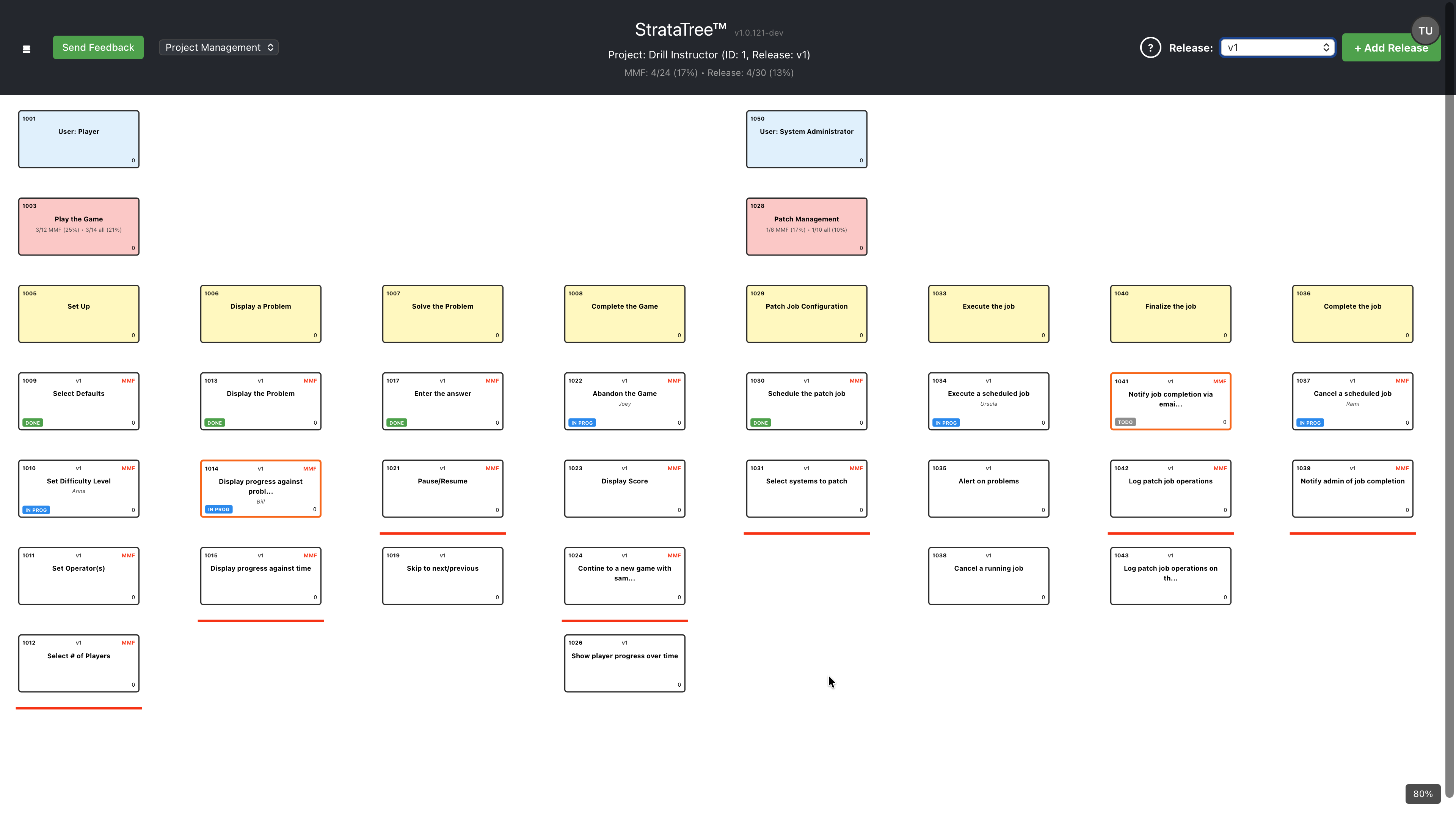
Track progress without heavy tools
Structured planning and tracking for anyone delivering work — not just teams using Jira or Azure DevOps.
- Plan your work, then work and track your plan — all in one place.
- See delivery progress with built-in state tracking, assignments, and blockers.
- Run small projects directly from your map. Grow into execution tools when you need them.
- Fill the gap between whiteboard chaos and enterprise tooling overkill.
Capabilities
Everything you need to create a plan and turn it into a backlog.
AI Map Builder
Turn a downloaded Jira or Azure DevOps backlog into a structured StrataMap in one pass: AI proposes user roles, features, steps, and placed stories, so you start from a real first draft instead of a blank canvas. It shows the proposed changes for you to review before anything is applied, and you bring your own OpenAI- or Anthropic-compatible key so your data stays yours.
StrataMaps®
Visualize your backlog as a hierarchically structured map with four levels: User → Feature → Step → Story. See the big picture and the details in one view.
Jira & Azure DevOps Integration
Pull your existing Jira or ADO backlog directly into StrataTree. Work items are automatically mapped to the hierarchy, with orphan handling for items that don't fit neatly. Organize your backlog into a StrataMap and push it back when you're done. Works out of the box; no tool configuration changes needed.
Release Management
Organize stories into releases with clear delineation between must-have (MMF) and nice-to-have functionality. Plan what ships when by dragging stories between releases.
Multi-Select & Drag-and-Drop
Select multiple nodes and reorganize instantly. Rectangle selection, bulk moves, and structural changes in seconds.
Feature Focus
Narrow the map to just the Features you're working on, organize and refine them, then Show all to return to the entire StrataMap. Step to the next Feature with Previous and Next.
Off-screen indicators
On large maps, each canvas edge shows how many items lie beyond it, such as "▼ 243 more". Click an indicator to scroll straight to them, so you never lose sight of the big picture.
Three modes, one map
Plan your hierarchy in Planning mode. Elaborate stories with descriptions, acceptance criteria, and estimates in Refinement mode. Track delivery progress with assignments and status in Project Management mode. Your data carries across all three.
Portable Map Files
Save and load maps as XML files. Share maps with teammates or keep versioned backups outside the tool.
Zero-Setup Local Storage
Your map persists in your browser automatically. No database, no configuration: just open and start planning.
Plan once, execute anywhere
Export structured planning data to Azure DevOps, Jira, MS Project, Smartsheet, and other tools. One plan, many destinations.
Feature availability varies by plan. See Pricing for details.
How StrataTree compares
StrataTree is the missing layer between other tools. It complements whiteboard, documentation, and execution tools by providing structured planning, backlog transformation, and release clarity that those tools are not designed to provide.
| StrataTree capabilities | Jira / ADO | Miro / Mural | Project / Smartsheet |
|---|---|---|---|
| Graphical backlog restructuring at scale | — | — | — |
| AI-assisted backlog organization | — | — | — |
| Use your own AI provider with Bring Your Own Key | — | — | — |
| Hierarchical planning with four levels of scope | ○ | — | ○ |
| See your entire backlog in structural context | — | ○ | — |
| Visual release boundaries with MMF markers | — | — | — |
| Download backlog from execution tools, restructure, sync back | — | — | — |
| Produces actionable work items, not just diagrams | — | ||
| Lightweight project tracking without enterprise overhead | — | — | ○ |
| Local-first: your planning data stays on your machine | — | — | ○ |
See what planning should feel like
Bring structure, clarity, and execution-ready planning to the tools you already use.