Your backlog isn't a delivery plan. StrataTree makes it one.
Beyond user story mapping to actionable backlogs.
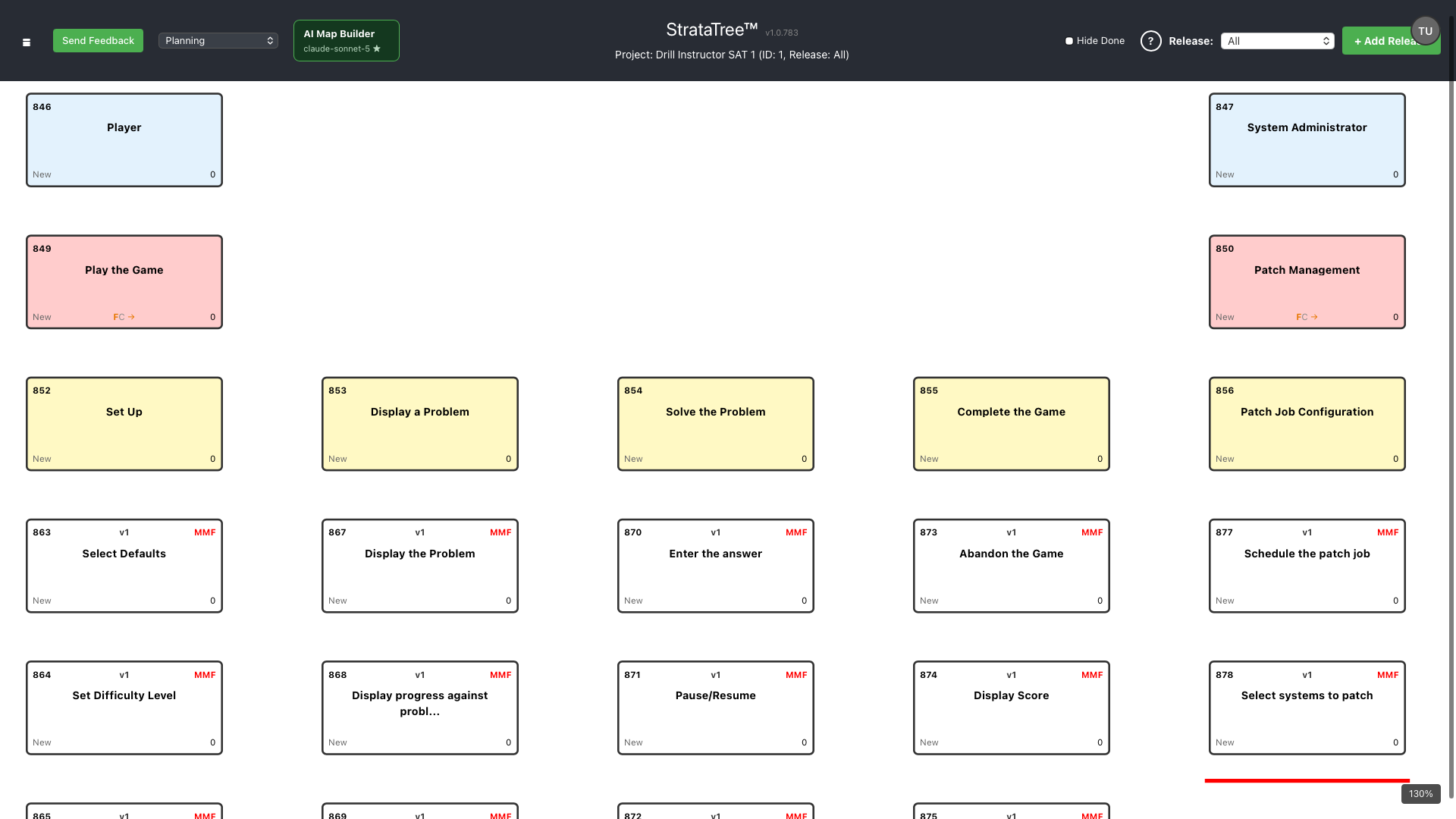
StrataTree is a story mapping and backlog planning tool for Jira and Azure DevOps. Using the StrataMapping method, teams start from a blank map or an existing backlog, organize the work into users, features, workflow steps and stories, by hand or with AI Map Builder, plan releases on the map, and upload the result to Jira or Azure DevOps.
See what to build, what to cut, and what to ship next. StrataTree is the planning link between your product roadmap and your product backlog, transforming your backlog into a user-centric, feature-based delivery plan. It works alongside Jira and Azure DevOps, providing a graphical way to create and organize your backlog.
Try Explorer plan free — no credit card. With paid plans, nothing is published back unless you choose to. Your maps live in your browser; your backlogs stay in Jira and Azure DevOps — we never store them on our servers.
Quick answers
- Can I use StrataTree without Jira or Azure DevOps?
- Yes. StrataTree works as a standalone planning tool for teams that do not use enterprise tracking systems.
- How does the Jira and Azure DevOps integration work?
- StrataTree connects directly to your Jira or Azure DevOps instance via these tools' REST APIs.
- Does StrataTree store my backlog data in the cloud?
- No. StrataTree is local-first. Your planning data is saved automatically to your browser storage to protect against unexpected interruptions, with no external database or server-side storage required.
Backlogs were built for tracking work. StrataTree is built for making the work make sense.
Before StrataTree
- Flat lists of disconnected tickets
- Stories grouped by area instead of user value
- Features mixed with tasks and partial ideas
- Missing stories and workflow steps discovered late
- Scope decisions based on argument instead of structure
- Sprint plans that do not add up to shippable progress
With StrataTree
- Backlogs organized to deliver user functionality rapidly
- Missing functionality visible easily
- Release boundaries shown directly in the plan
- Everyone can see what is being built, how it works, and why
- Drag-and-drop restructuring quickly eliminates chaos
- No re-entering of items... Jira and Azure DevOps stay in sync with the improved plan
See the transformation
How it works
From a messy backlog to a structured, shippable plan — in one session.
Connect or start fresh
Pull your existing backlog from Jira or Azure DevOps in seconds, load a StrataMap file, or start a new map from scratch. No migration required.
Map your plan visually
Organize work into a clear hierarchy — Users, Features, Steps, Stories. Drag and drop to restructure. Spot oversized features, missing steps, and scope gaps before they become sprint problems.
Publish back when you're ready
Push your refined backlog back to Jira or Azure DevOps, or save your map as a portable file. Your execution tool stays in sync with your actual plan.
Progress reports aren't progress
Busy teams with nothing to show aren't slacking — they don't have an actionable plan. StrataTree gives them one they can deliver incrementally, so you see real progress every sprint.
'Why are we building this?'
Flat backlogs hide context. StrataTree shows scope as a visual hierarchy so teams see what they're building and why.
Tradeoffs shouldn't be guesswork
Know what's safe to cut. See priorities, dependencies, and MVP boundaries at a glance.
Find the gaps before they find you
Catch unnecessary scope and missing functionality before they derail your project.
Restructure without starting over
Drag, drop, and reshape your plan instantly without losing context.
Track simple projects simply
Lightweight tracking for projects that don't need enterprise tools.
Your plans stay yours
Your maps stay on your machine. You control where your data lives.
The power of StrataMapping has helped teams plan better and ship faster across the world since 2010.
Built on planning practices proven at Microsoft, HP, the U.S. Air Force, Fandango, BD Biosciences, and others since 2010.
The release planning approach that StrataTree supports has provided us a valuable tool that has cut our backlog creation time in half and led to significant increases in delivery rates.
VP of Software
Enterprise software company
These backlog creation techniques significantly improved our ability to create actionable backlogs that supported our teams and reduced rework, allowing us to deliver more quickly saving millions in project costs.
Software Engineering Manager
Medical-device software organization
Using hierarchical story mapping to create our product backlog for our healthcare SaaS product helped us overcome planning hurdles that had largely stopped us, and enabled us to plan and implement over 150 features and capabilities while supporting effective estimation, tracking, and forecasting—delivering as predicted with zero defects and making the project a resounding success.
VP of Product
Healthcare SaaS company
AI Map Builder
Import a backlog.
Get a structured map back.
Downloaded a backlog from Jira or Azure DevOps? AI Map Builder reads the raw tickets and proposes a complete story map — user roles, features, steps, and placed stories — so you skip the blank canvas and start from a real first draft.
The tedious first pass done for you
An unorganized downloaded backlog becomes an organized, prioritized map in one pass, saving you time.
You stay in control
It shows the proposed changes first. Your map isn't touched until you click Apply, and the changes are a single undo.
A starting point you refine
Get 80% of the structure instantly, then adjust it: move stories, reorder features, until you're satisfied.
Bring your own AI key — your data stays yours
Connect any OpenAI- or Anthropic-compatible provider. Your backlog is sent to your AI account under your terms — never through, or stored on, StrataTree's servers. Your IP stays protected.
Included free during early access on Explorer, Product Owner, and Portfolio — and available on Enterprise.
What StrataTree AI proposes
Pricing
Love it or get your money back — 60-day guarantee.
Explorer
Explore StrataTree with your real Jira or Azure DevOps data — free, forever. Reorganize backlogs in your browser; upgrade when you're ready to save a portable file or publish changes back to your tools.
- Start instantly with our Jira and Azure DevOps demo backlogs — no credentials, no IT approval needed.
- Or, download your Jira or Azure DevOps backlog and see it as a visual map — instantly
- Load and explore any StrataMap XML file
- Reorganise and restructure your map in the browser
- Your work is saved in your browser — upgrade to save it to your desktop or sync it back to your tool
- AI Map Builder — included
Planner
For teams planning projects without Jira or Azure DevOps.
- Visual mapping for any project or initiative with StrataMaps
- Track progress with built-in project management mode
- Save, load, and share StrataMaps as portable XML files
- Ideal for marketing, operations, events, or personal projects
Product Owner
For Product Owners managing one team's backlog.
- Everything in Planner, plus execution tool integration
- Download a backlog from Jira or Azure DevOps into a StrataMap
- Publish refined work items back to your project
- Keep your execution tool in sync with your planning
- AI Map Builder — free during early access
Portfolio
For leaders managing work across multiple teams and tools.
- Everything in Product Owner, plus multi-project support
- Work with any number of Jira and Azure DevOps projects
- Migrate backlogs between Jira and Azure DevOps via StrataMaps
- Coordinate releases and dependencies across teams
- AI Map Builder — free during early access
Enterprise
Custom licensing for organizations with multiple users.
- Volume licensing for your entire organization
- Dedicated onboarding and training
- Priority support and SLA
- Custom integrations and feature requests
- Run StrataTree on your own private cloud with our self-hosted option
- AI Map Builder — available on Enterprise
Secure payments powered by Stripe® — we never see or store your card details.
All plans include a 60-day money-back guarantee. Try risk-free. Need help choosing? Contact us or email demo@stratatree.co.