Here's Why You Should Use Strata Mapping Instead of User Story Mapping
TL;DR: User Story Mapping is adequate for planning a sprint or two for a single team. Most organizations have to plan out multiple releases for multiple teams, and that's why Strata Mapping was invented. This article shows you why and how Strata Mapping solves real problems that User Story Mapping can't.
Your Story Map Can't Tell You What to Release (a Strata Map Can)
A LinkedIn post crossed my feed this week showing how to use user story mapping to identify "features" for release planning. The diagram was clean, the explanation was clear, and the technique was something I've seen taught and practiced widely for years. It was also a good illustration of a structural limitation that led me to invent Strata Mapping back in 2010.
This article is not a criticism of Jeff Patton, the LinkedIn poster, or user story mapping. My chance encounter with Jeff at Agile 2009 when he was hanging out in a hallway because he couldn't get attention for story mapping was inspirational and led to the development of Strata Mapping as an evolution of user story mapping that made mapping of functionality a defined process instead of a craft, and that is better suited for release planning and backlog creation, for small single-team projects and large multi-team projects with many features.
My reason for writing this article is to help others learn better ways, and I stand on the shoulders of giants.
A User Story Map for an Online Purchasing Feature
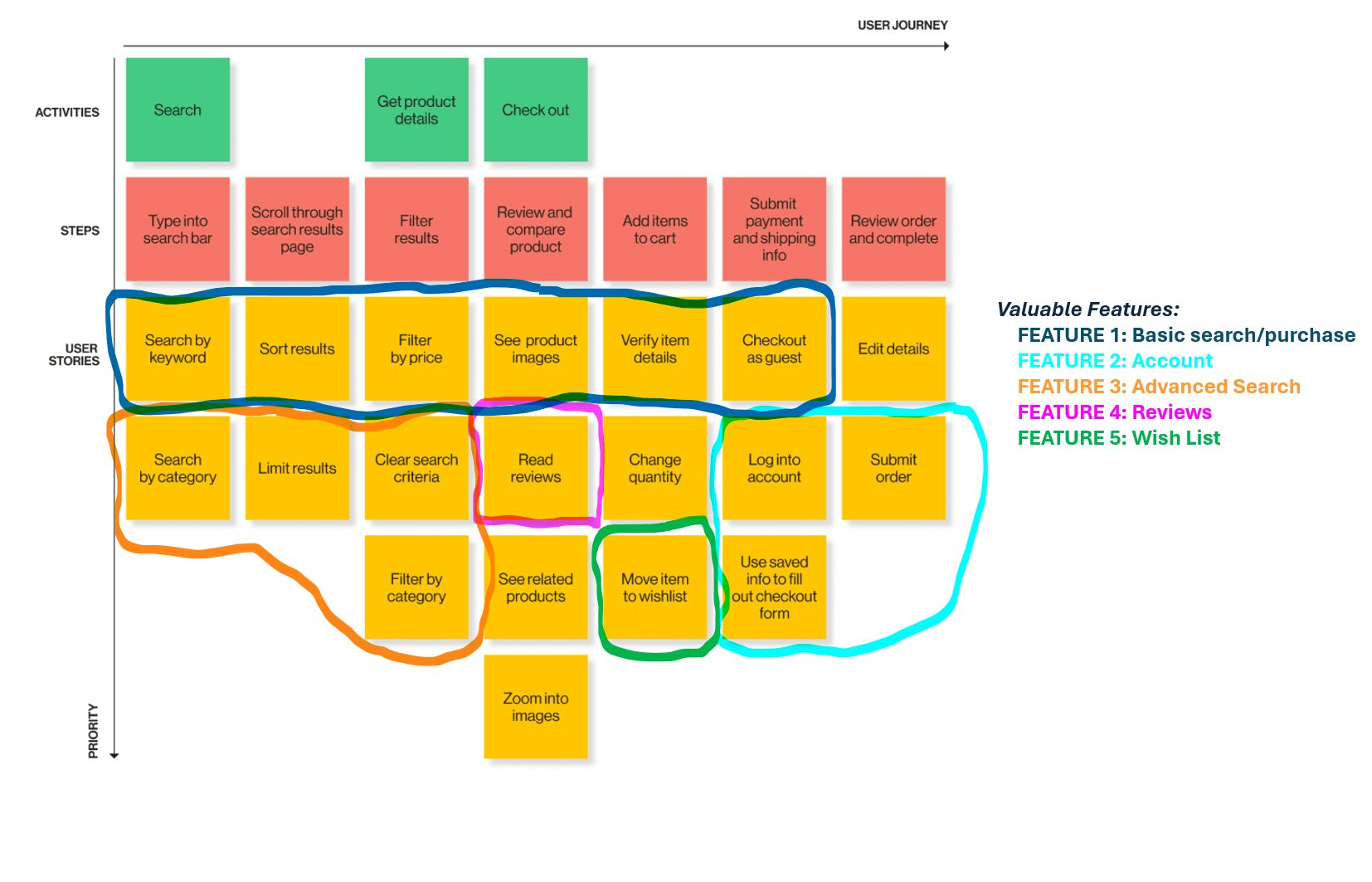
The story map shown above follows Patton's approach faithfully. At the top you have the Activities (the large-grained action a user does to purchase an item online): Search, Get product details, and Check out. Below those sit Steps, the more specific actions (but bound tightly with UX design) within each Activity: Type into search bar, Filter results, Submit payment and shipping info. Below the Steps, arranged vertically by importance/priority, are the User Stories, the discrete deliverables of functionality that the team would build and test to enable the Activity.
The horizontal axis represents left to right how the user proceeds to execute the Activities and engages the functionality to accomplish his larger action, and the vertical axis represents descending priority within each column. User story maps are intended for getting a room full of people aligned on what the general workflow for a business activity requires and what functionality is needed at each step to support the workflow.
Where User Story Mapping Struggles
The post I read took the next step that I've seen many practitioners take: drawing circles around groups of stories and labeling each circle as a "Feature." The legend on the diagram above names them Feature 1 through Feature 5, with Feature 1 labeled "Basic search/purchase," Feature 2 "Account," Feature 3 "Advanced Search," and so on.
Here's the problem. Those circles aren't identifying features. They're grouping functionality that can be released separately (in separate releases) and that incrementally increase the functionality and usability of the feature we might call Online Purchasing.
Calling this encircled functionality a 'Feature' obscures what the circle is actually doing, which is defining a limited scope for prioritizing over one or more releases. Yet, no 'Feature' offers sufficient functionality by itself to be useful to users, not excepting 'Feature 1.'' What's missing? The ability to add payment and delivery details and submit the order. Without these there's not enough functionality to fully enable basic online purchasing… yet these aren't included in 'Feature 1' or any of the other defined/circled 'Features.' Can you have a functional Online Purchasing feature if you just release the functionality in Feature 1?
Look at the User Stories 'Feature 1' actually contains: Search by keyword, Sort results, Filter by price, See product images, Verify item details, Checkout as guest, and Edit details. That's not a feature, that's a subset of feature scope comprised of a set of stories drawn from multiple Activity columns, assembled into a defined (but functionally incomplete) delivery unit because they collectively enable the majority of the basic version of the shopping experience. Similarly, the other circled 'Features' are what we define as Enhancements, or functionality added to an existing Feature to increase value for users, in Strata Mapping.
Now, I've heard responses to earlier versions of this article that I'm not being fair to this user story map. 'Checkout as guest' has included functionality thatsupports entering customer information and submitting the order and so Feature 1 is complete, right? My response: then we've duplicated functionality for 'Edit details' and 'Submit order'? The problem with that response is that it assumes the not-yet-developed acceptance criteria will cover this missing functionality. Remember, proper User Stories should be increments of functionality, not duplicates. They must be independent and not duplicative. Second, let me repeat the key question: can 'Feature 1' functionality be released and be useful to users? If the answer is no, then it's not a feature, it's a subset of a feature that lacks sufficient value to the user to be released on its own.
And that's where the structural limitation appears. The circle is a spatial construct that crosses Steps but doesn't cover all Steps. It groups stories that are drawn near each other on the board, and it mostly works to group enhancements of functionality (for the 'Features' after Feature 1) because an experienced practitioner drew it with good judgment. But the map itself has no mechanism that enforces or explains that grouping. There's no rule in the model that tells you why "Filter by price" belongs in the 'Feature 1' group but "Filter by category" belongs in the 'Feature 3 (Advanced Search)' group. The answer lives in the practitioner's head, not in the structure of the diagram. Even worse, if all of the circled User Stories are implemented there's still missing functionality: the ability to edit the order details. I want to reiterate that the 'Edit details' story was so important that it was in the top of the column, yet it was not included in the 'Feature 1' circle. Why? Because unlike Strata MappingUser Story Mapping has no mechanism for identifying the dependencies between stories that are required to deliver a functional feature, and thus no mechanism for ensuring that those dependencies are included in the same release.
This matters more than it might seem. When plans change, as plans always do, a team using story map circles has to redraw the circles by hand, re-examine the whole spatial layout and perhaps rearrange it, and reconstruct the release logic from scratch. There's no versioning information in the model itself.
The consequences of this aren't just aesthetic, they're functional. Look at the story map again. A user can't move an item to their wish list without being logged in, yet "Move item to wishlist" and "Log into account" are in different circled groups. And "Basic search/purchase," the first thing a user needs to do, doesn't include the ability to submit an order. How does a basic purchase work without that? These aren't planning preferences, they're broken release scopes. The circle grouping has no mechanism for detecting cross-feature dependencies, because it has no model of what a feature actually requires to function. The effect of this is that missing functionality will only be discovered later in the release cycle, when it's more expensive to fix, and the team will have to scramble to add it in, which leads to delays.
How Strata Mapping Solves This Structurally
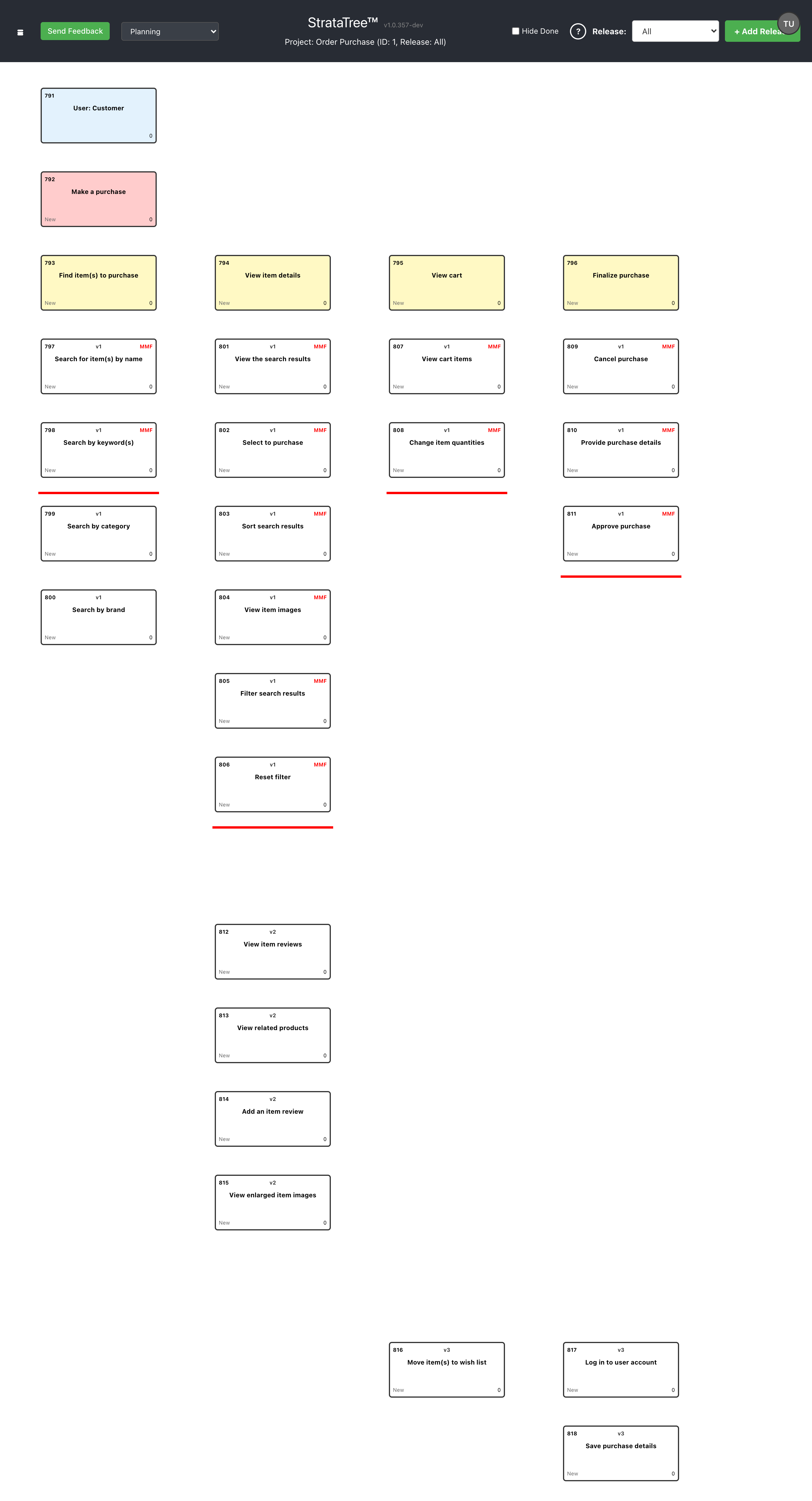
A Strata Map has a different structure based on a four-level hierarchy: User, Feature, Step, and Story. Every Story in the map can (and should) be associated with a release.
To create a Strata Map, we start with Users, create one or more Features (aggregates of functionality comprising a workflow that Users complete to obtain a desired benefit) for Users, define the workflow for each Feature as a sequence of Steps, and then create and prioritize Stories for each discrete piece of functionality under the Steps.
We begin the prioritization process by prioritizing our users, placing the most important user (the user you would build functionality for if you had to choose just one) at the top of the Strata Map, the next most important user (the user you would choose to build functionality for from the remaining set of users), and repeat this process until you defined a minimal set of users to support for the initial release.
Similarly, we identify the most important Feature from the set of Features for the most important User, and then repeat this process from the remaining Features… and then repeat this process across the list of Users until we either run out of Users and Features, or more likely we identify enough Features for enough Users to define a valid v1 release.
Strata Mapping uses the concept of Minimum Marketable Feature (MMF); the minimum set of Stories required for a user to complete the workflow and obtain the intended benefit. Every Feature introduced in a release must be implemented to at least MMF. We can extend this idea to the release level: the aggregate of all MMF Stories across all Features in a release defines Minimum Releasable Functionality, the release-level equivalent of what people loosely call an MVP (though MVP properly belongs in the prototyping phase, not commercial release planning).
The beauty of a Strata Map is that all this is immediately and obviously visible, without having to draw arbitrary circles on a user story map.
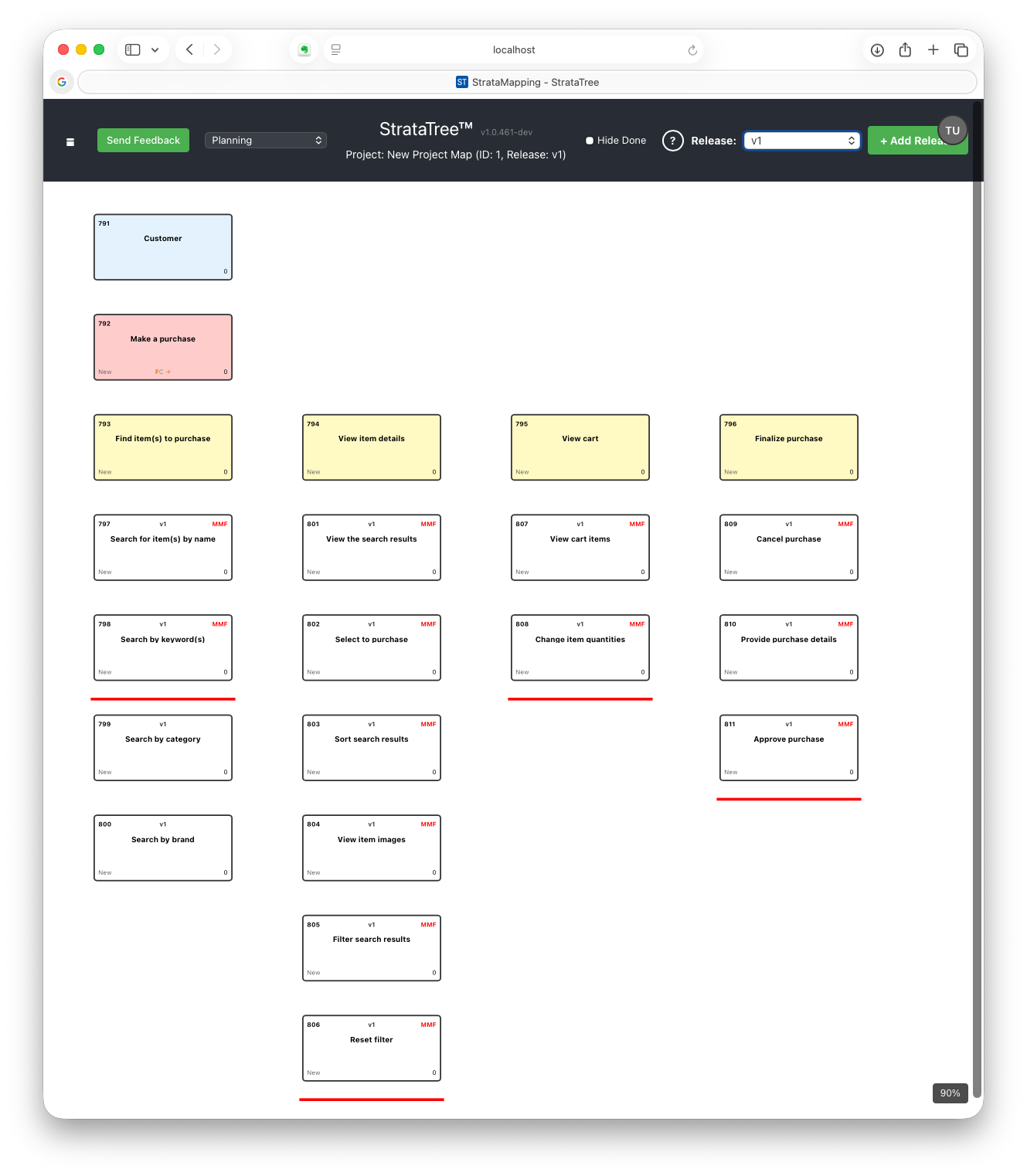
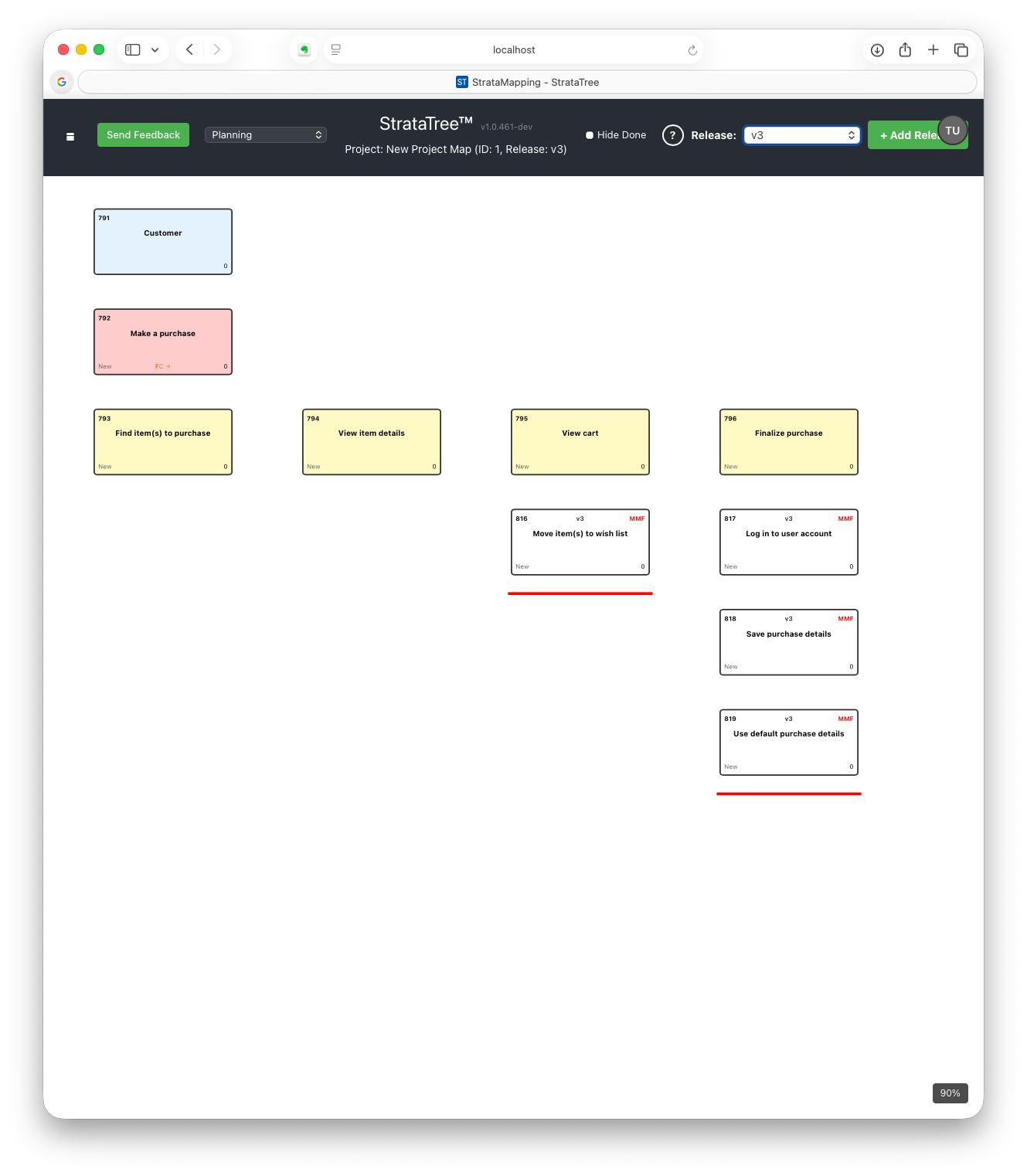
What you can see in the release images above is something that a user story map with drawn circles cannot produce (because the process of identifying functionality by release is not integral to the map): a clean, mechanically defined release scope with no ambiguity about which stories belong where. Although 'Search by category' was not included in 'Feature 1' on the user story map, it is shown as being in scope, if time permits, for v1 on a Strata Map (given my knowledge of software development, this is how I might plan the v1 release knowing that 'Search by category' should be a minor variation of 'Search by keyword'. Note also that there is no separate 'Search' feature, as the search Stories make no sense outside the context of the Online Purchase Feature.
There's also no terminology collision. The Features are the Features: persistent product capabilities that grow across releases. The releases are the releases: horizontal slices through the Feature hierarchy at a given version level. The two concepts don't get conflated because the structure keeps them separate.
Viewing Feature Enhancements for Subsequent Releases
When a Feature is introduced in a release, it must be implemented to MMF with at least one Story under each Step. In subsequent releases, additional functionality can be added under one or more Steps to enhance functionality, but there is no requirement to have at least one Story per Step. We call this subset of Stories that enhance functionality for an existing Feature an Enhancement to reflect that it can have Steps without Stories.
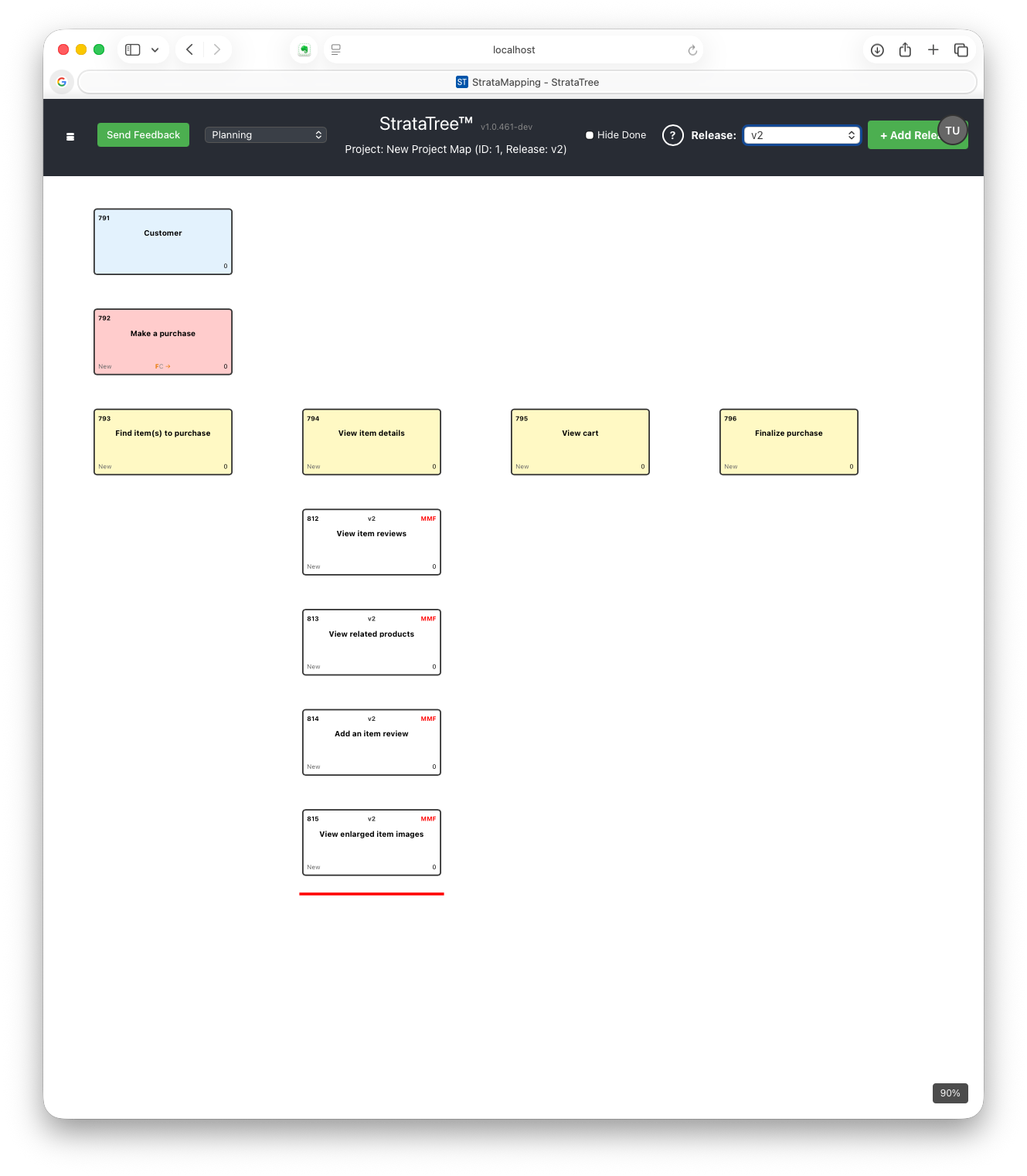
The key word here is enhancement; it's not a new feature, and it's not a separate grouping that needs to be circled and labeled. It's an explicit grouping of Stories under Steps that can be easily recognized, and the release information is structural metadata, not a drawing on top of the map. Thus, release scoping is clearly shown by a horizontal cut, not a drawn circle.
Why This Matters for Planning at Scale
If you're planning a small release with a small team and a short timeline, story map circles can work. The practitioner doing the circling knows the domain, the team can hold the logic in their heads, and the plan is simple enough that redrawing circles when things change isn't a serious problem. Even so, Strata Mapping provides a better solution.
However, when it comes to large projects with dozens or hundreds of features, you need a defined approach to planning to ensure it can be done quickly at scale by a team of Product Owners or project managers. More important, you need an approach that ensures dependent Stories are included in the same release.
The projects and programs I've worked with over the past two decades… medical device programs with component application software, device firmware, and device hardware projects, large multi-team web platforms and applications, silicon chip design projects, even large IT enterprise application migration projects… must rely on a methodology that identifies dependent functionality. When a stakeholder asks why Feature X is scoped the way it is for a release, "because we drew the circle there" is not a defensible answer. When a release gets delayed and you need to replan quickly, you need an approach that facilitates reprioritization after rescoping.
More important, note that some Stories cannot deliver value without other Stories. For instance, how can a user move an item from their cart to a wish list if they haven't logged into their account so the wish list can be associated with the user… yet these are different 'features' in the user story map? How can the user complete the online purchasing process if they can't submit the order, yet the submit functionality is not in the Basic Purchase 'feature?' Strata Mapping makes these missing Stories as obvious as a flare fired at midnight, precisely because of the way releases are structured.
In Closing
User story mapping was a great leap forward, helping to visualize product backlogs for single teams and small projects, and was a valid solution for the problem it was aimed at. Jeff Patton deserves a lot of credit for making that intuitive leap. I think about that and how his submission for the Agile 2009 conference was turned down because what he came up with was too radical for its time. I understand that; I submitted a proposal for a presentation on Agile planning and estimating using Strata Maps to the global Scrum Gathering/New Orleans in 2014 and was rejected, being told that "this wasn't exciting." I went to SGNO anyway and signed up to run an Open Space session on Agile planning using Strata Mapping. The organizers had to move my session into a ballroom because the original room was too small, yet the larger ballroom was packed. Several attendees came up to me after the session and told me it was the single most valuable session at the gathering. I understood: they lived in the same problem space that led me to create Strata Mapping.
Jim Clifford's Accurate planning & estimation during open space was most beneficial session @ #SGNOLA It rocked!!!
— Gary Mullins (@garymullins) May 7, 2014
Back in the early days of Scrum, most of us learned how to create backlogs by creating one-dimensional lists. The inclusion of Epics as an organizing tool created a list of lists. Planning larger projects, and re-planning struggling in-flight projects, with hundreds of backlog items, is difficult to impossible using a list or a list of lists… but it can be readily handled with a much smaller and more cohesive list of User-based trees of Features.
Strata Mapping grew from these needs. It was designed to make release planning occur as an inherent attribute of the map rather than an overlay on top of it, and to provide a simple way of knowing how to add scope to current or future releases while ensuring the quickest path to delivery.
All Strata Maps shown in this article were created using StrataTree™, the web-based Agile planning platform based on the Strata Mapping approach, that can be used standalone or with your Jira or Azure DevOps projects.
Originally published in CodeX on Medium · View original